DSHBox sidebar enhancement: 45–100% width, scene presets, balance privacy/warning/auto-hide with a low-balance dot, reading density, accent colors, multi-wallet display, settings backup and diagnostics, Chinese/English UI; draggable ☰, left/right layout, adjustable swipe zone, copy and keyboard fixes. Targets DSHBox 1.4+/1.5.x, DSH 0.2.x and Android 10+; tested on 1.5.1 / 0.2.1-rc.5 / Android 14.
Install
# from GitHub (first run asks for allowBuilds approval — follow the hint, retry)
dsh plugin --profile web add github:yinfenAce/dsh-sidebar-optimization
Any plugin you install runs third-party code with your own permissions — it can read your files, use your credentials, and reach the network, and tool approvals don’t sandbox it. GitHub-sourced plugins also run build scripts at install time — pnpm blocks those until you allow them, so an install can stop with ERR_PNPM_GIT_DEP_PREPARE_NOT_ALLOWED or ERR_PNPM_IGNORED_BUILDS; dsh prints the exact key to add under allowBuilds in your profile’s pnpm-workspace.yaml, and the install works on the next run. Allowing a build is a trust decision: only install sources you trust, and pin a commit (github:owner/repo#sha).
README
中文 | English

侧边栏优化 · dsh-sidebar-optimization
· · v0.8.5 · Changelog
Sidebar optimization for DSHBox / DeepSeek Harness (DSH).
A small, client-only layer on top of the bundled @local/dsh-mobile-adapt plugin. It does not replace
that plugin; it only overrides a few mobile-specific styles and adds a couple of interactions.
Language
The settings card follows the system language by default. Switch between Auto / 中文 / English under General. English is an initial static translation, not a runtime translation service. Wording improvements are welcome via TRANSLATIONS.md.
Screenshot
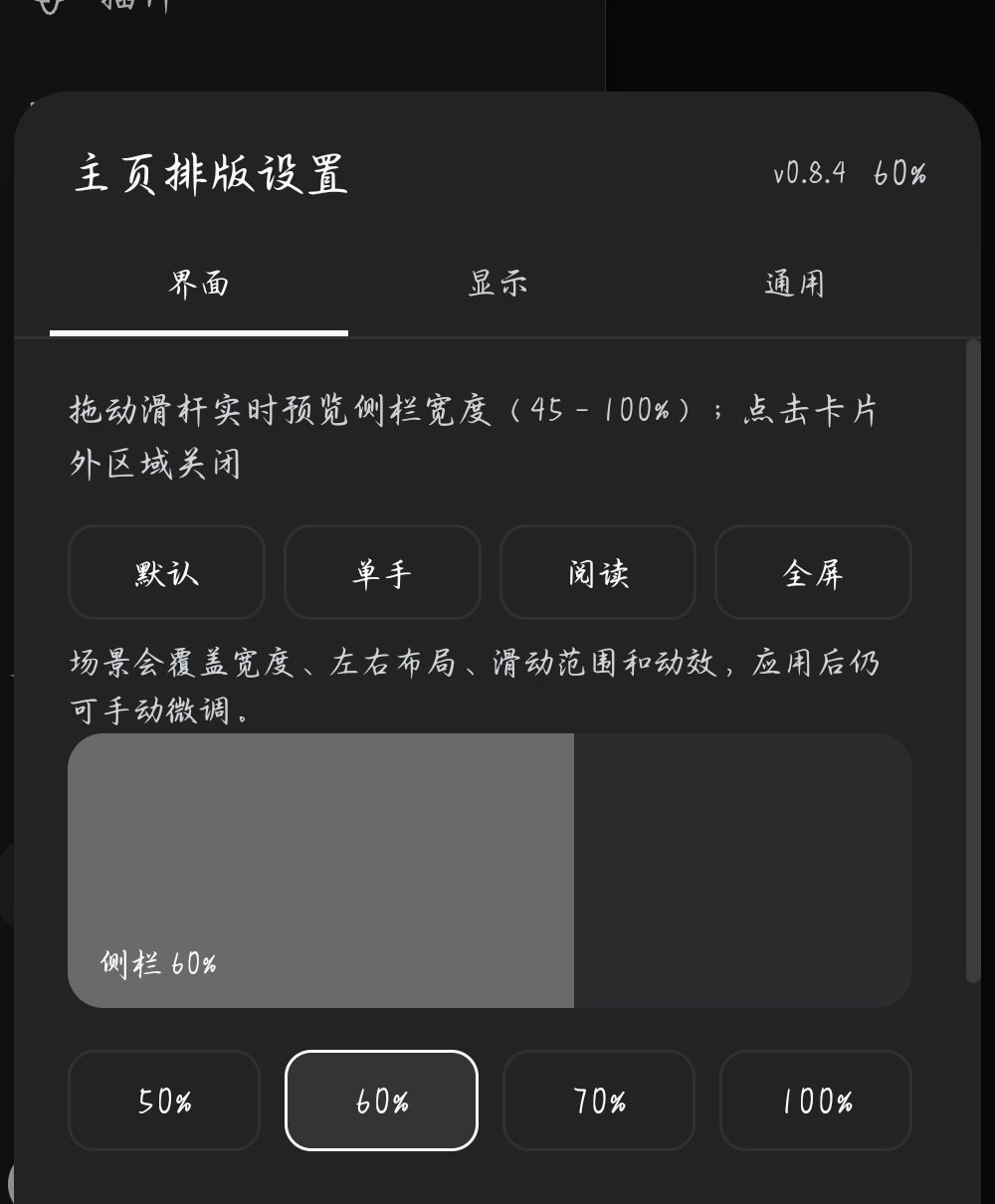
Real device screenshot on v0.8.4; settings UI unchanged in v0.8.5: scene presets, live width preview and accent color.
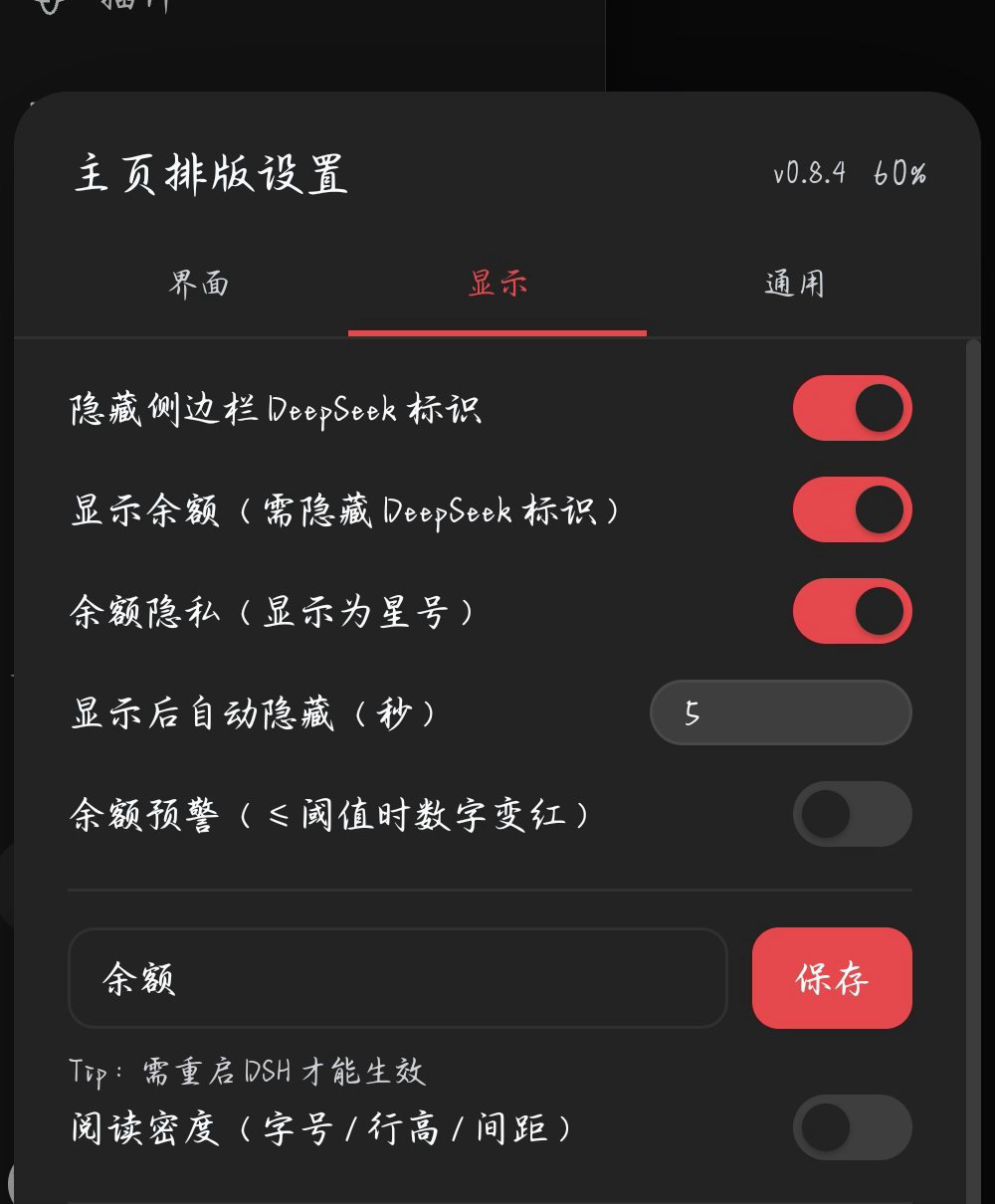
Balance privacy, auto-hide and low-balance warning.
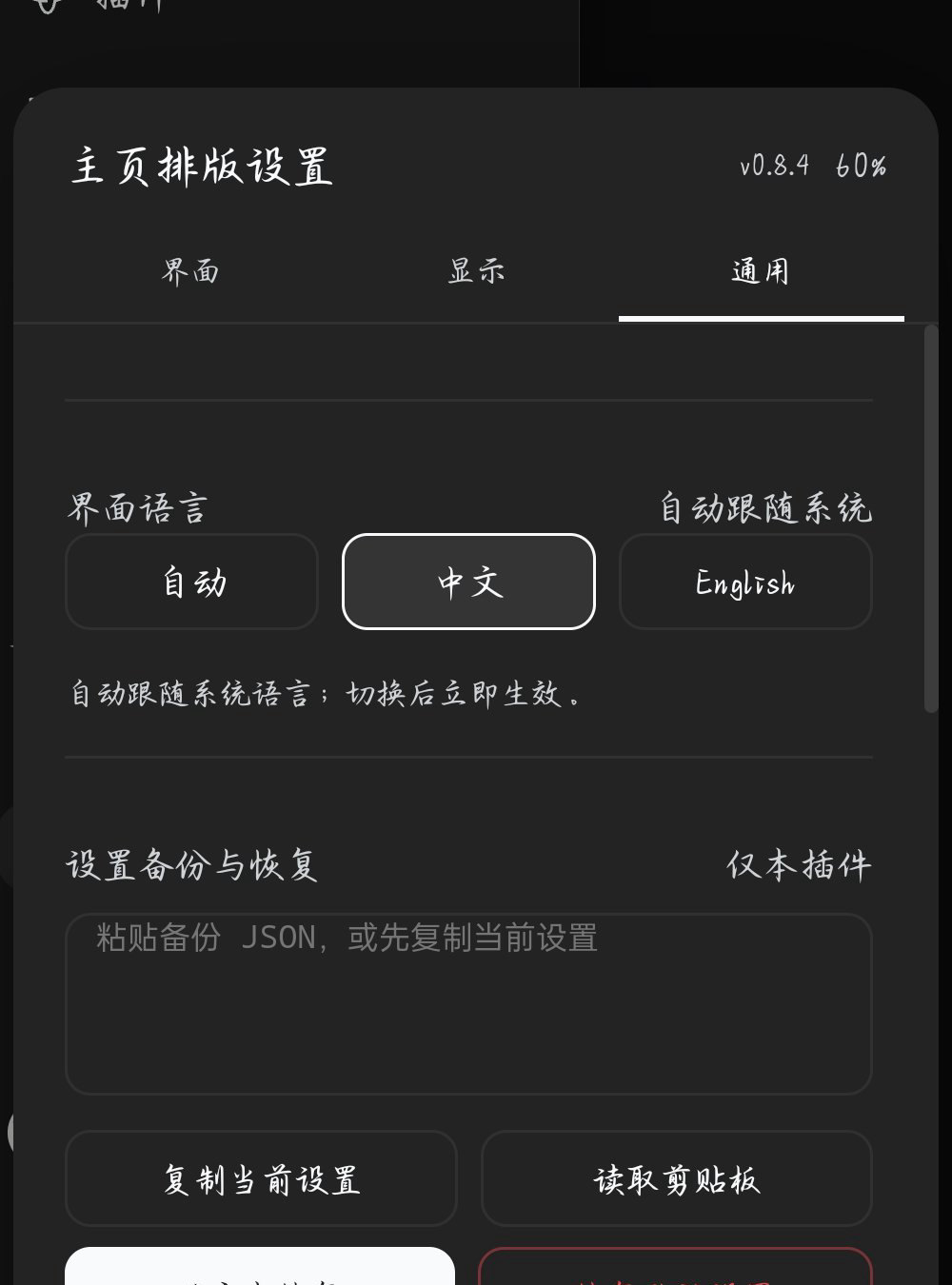
Language, backup and diagnostics controls.
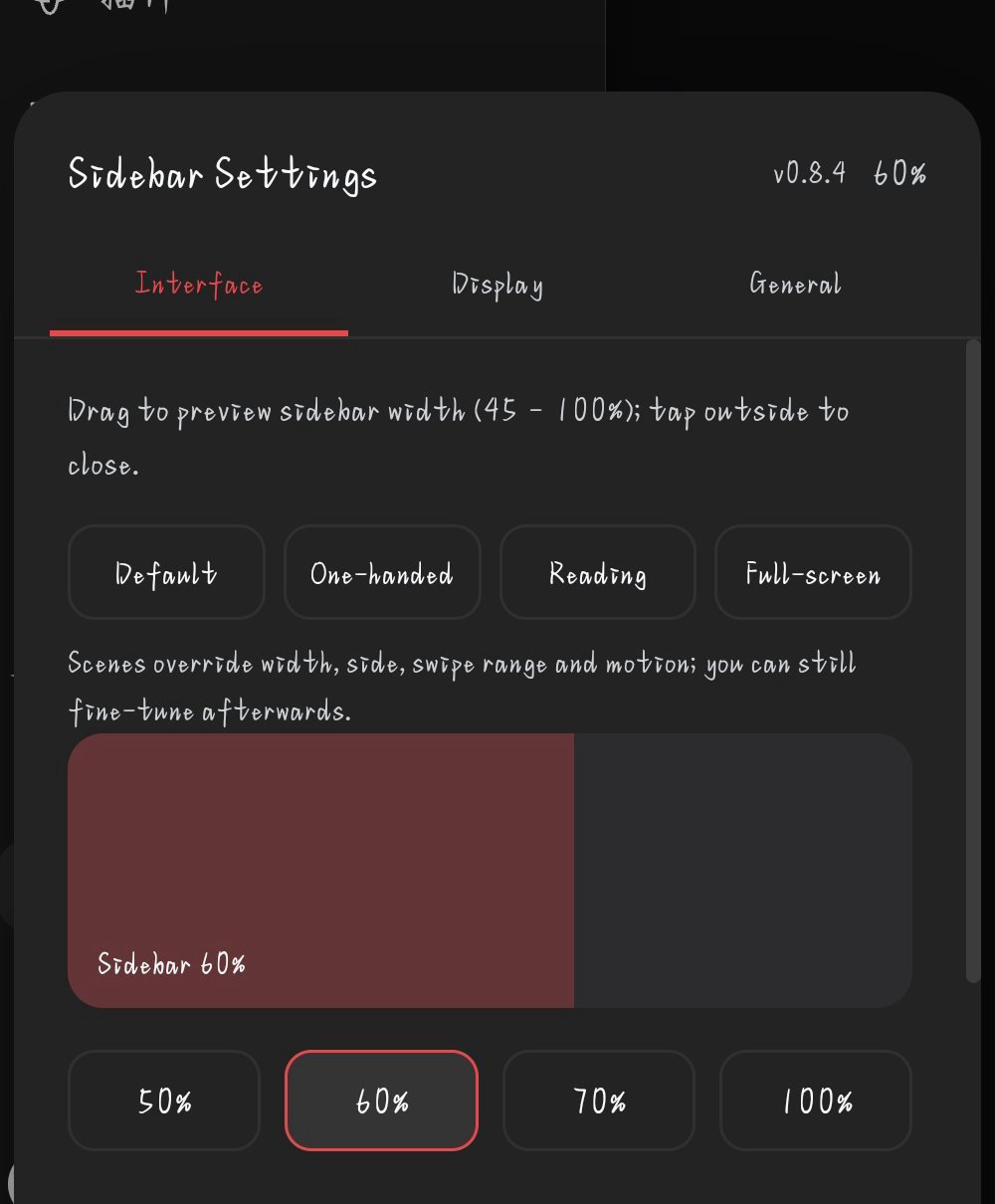
English UI.
What it does
- Adjustable half-screen sidebar — default 60% of the viewport. Open the sidebar and tap 「主页排版设置」 above Settings; a card opens with a live preview, 50% / 60% / 70% / 100% presets and a custom 45%–100% slider. The choice is remembered.
- Scene presets — Default / One-hand / Reading / Full-screen; each sets width, side, swipe range and motion at once.
- Reading density — body font 13–20px, line height 1.3–2.0, message gap 0–24px; the Reading scene enables it with 16px / 1.8 / 12px.
- Accent color — Default / Red / Orange / Yellow / Green / Blue / Purple, plus transition hues; applies to this plugin's tabs, switches, sliders and primary buttons.
- Balance currency — dynamically generated from the account's actual wallets, three per row; shown only with multiple wallets; Auto prefers CNY and falls back to the first.
- Diagnostics — copies plugin/app versions when available, Android/WebView/model, screen/orientation, settings, feature checks and the last 5 errors; no account, balance or chat data. The report button prefills a GitHub issue with the same data.
- Tap the blank area to close — the backdrop is forced visible (the bundled plugin hides it with an
inline
display:none), so tapping the right-hand blank strip closes the drawer. - Free single scroll — panels, the session list and the footer scroll as one column, instead of the session list scrolling inside a squeezed box.
- Sticky footer — settings/footer stay reachable while browsing a long session list.
- Long-chat performance —
content-visibility: autoon chat turns; off-screen messages are skipped during the reflow caused by the on-screen keyboard. - Keyboard follow —
visualViewportresizes the root immediately when the keyboard opens/closes, instead of waiting for100dvhto be recalculated. - Adjustable swipe zone — 20–80% of the screen from the active edge, with a flashing guide in the current accent color (white by default) while you adjust it; the guide stays under the settings card.
- ☰ position reset — long-press drag still works; a reset button restores the default position.
- Motion switch — tab switches and conditional rows animate too; turn it off to make card, toast, guide, menu, tab and view animations complete immediately.
- Low-balance dot — when the warning threshold is breached, a small red dot appears on the 「主页排版设置」 row; the last low state is remembered so it shows immediately when the drawer opens, without revealing the amount.
- Swipe gestures (experimental) — swipe right from the left third of the screen (chat, plugins, task board or any other page) to open; swipe left to close. If it does not trigger on your device, the ☰ button still works; it can be turned off in the settings card.
- Session tap closes the drawer — after selecting a session, the drawer collapses automatically (unless DSH already closed it).
- Open reveals the active session — opening the drawer scrolls the current session into view.
- Balance quick actions — tap the amount to open 「查看用量 / 充值」; usage checks installed + enabled third-party usage/context plugins and falls back to the platform usage page, top-up opens the DeepSeek platform.
- Live account balance (optional) — refreshed whenever the drawer opens, formatted to two decimals. It is shown only when the DeepSeek mark is hidden; with the mark hidden and balance off, nothing is shown. A 2–4 character custom label can be saved in the card (restart DSH to apply).
- Balance privacy — masks the amount as
****with an eye-slash button; the eye reveals it temporarily, and closing the drawer or switching apps re-masks it. - Low-balance warning — optional threshold (default ¥1, max ¥999999); the amount turns red at or below it. The balance menu also has a manual refresh action. Presets 1 / 5 / 10 are available.
- Auto-hide countdown — when privacy is on, the revealed amount returns to
****after a configurable 5–600 seconds (default 30). - Settings backup — copy the plugin's settings as JSON, restore from pasted text, or reset only the plugin's own keys. Reset clears width, layout, swipe/gesture, brand, balance/privacy/warning, auto-hide, label, manual entry and ☰ position; it does not touch the DSH account, balance data, chats or other plugins. The page reloads after restore/reset.
- Left/right layout swap — move the sidebar to the right and the right panel to the left; the swipe direction reverses with it (right third, swipe left to open).
- Draggable ☰ button — long-press the ☰ and drag it; on release it snaps to the nearest side, and the position is remembered.
- Hide the DeepSeek brand mark — optional toggle in the settings card; the collapse control stays in place.
- Tabbed settings card — top tabs for Interface, Display and General; the Interface tab is selected by default; tapping another tab switches the panel and slides the active indicator.
- Scrollable settings card — the card stays centered; its content scrolls when the viewport is short.
- No blue focus ring on tap — touch interactions no longer leave a square focus outline; keyboard focus rings are preserved.
- Copy that actually works — a textarea/
execCommandfallback backs the Clipboard API, and every code block gets a visible “复制” button. - View-switch transition — switching the top view/trajectory tab fades and lifts the new content in instead of snapping.
- Touch polish — 42px panel rows, vertical-only panning inside the drawer, safe-area bottom padding.
Adapting another usage plugin
The balance menu looks for an enabled bundle whose id/name matches context, usage, token-usage or token-meter, then opens that plugin's feature entry (the sidebar item or conversation-view tab whose text matches the plugin's title). It does not open the bundle's configuration page.
To add a plugin that is not auto-detected, either fill the manual entry form (package name + sidebar/tab label; use 「扫描当前入口」 and 「验证入口」) in the settings card, or add its bundle id and a short navigation label to USAGE_BUNDLES in lib/client.js. If the plugin has no feature entry (only a settings page), the usage action falls back to https://platform.deepseek.com/usage.
Compatibility
- DSHBox: designed for 1.4+ / 1.5.x with the bundled
@local/dsh-mobile-adaptplugin enabled; tested on 1.5.1. - DSH: declared
>=0.2.0-rc.2 <0.3.0(0.2.x); tested on 0.2.1-rc.5. 0.2.0 and 0.2.2 are expected to work. - Android: 10+ with a current WebView; tested on Android 14 (system WebView).
- Viewport: ≤ 1024px (phone/tablet). Desktop layouts are untouched.
The tweaks target the generic sidebar classes (sidebarCol, logoRow, footArea, viewArea, data-chat-turn), so other combinations are expected to work. They are not individually tested; if a DSHBox update changes the drawer DOM, some rules may stop applying — open an issue with your version and a screenshot.
Install
From npm (once published):
dsh plugin --profile web add dsh-sidebar-optimization
From source:
dsh plugin --profile web add github:yinfenAce/dsh-sidebar-optimization
Then restart DSH (or reload the DSH page) so the client bundle is served.
Historical releases are hidden from the public release page. Install the latest release or
main; do not use older tarballs.
Install a pinned version
Every release also attaches an npm-format tarball, so you can install an exact version without publishing to npm:
dsh plugin --profile web add https://github.com/yinfenAce/dsh-sidebar-optimization/releases/download/v0.8.5/dsh-sidebar-optimization-0.8.5.tgz
Turn it off
The tweaks follow the Mobile adaptation switch in DSHBox: when @local/dsh-mobile-adapt is turned
off, this plugin's style is disabled too.
To remove the plugin:
dsh plugin --profile web remove dsh-sidebar-optimization
Caveats
- This is an overlay on the bundled plugin's DOM/CSS. A DSHBox update that changes
dsh-mobile-adapt's class names or drawer structure can break parts of it. - Only mobile widths are affected; the desktop layout is deliberately left alone.
- No background services, no data collection, no network calls.
Development
npm run check
npm test
npm pack --dry-run
License
MIT. See LICENSE.
Links
More in this category
zhu1090093659/dsh-web#packages/dsh-task-board★ 10504
Task board for the dsh web GUI: a sidebar multi-column kanban whose cards run in real DSH agent sessions and can also be scheduled with cron expressions, executed host-side even with the browser closed.
omdsh-dev/DSH-better-sidebar★ 5220
Full sidebar workbench with file rendering and editing, terminal, Git, and subagents; third-party plugins can register new tabs.
Community comments
Comments are public GitHub Discussions. Loading them connects to GitHub and Giscus; a GitHub account is required to post.